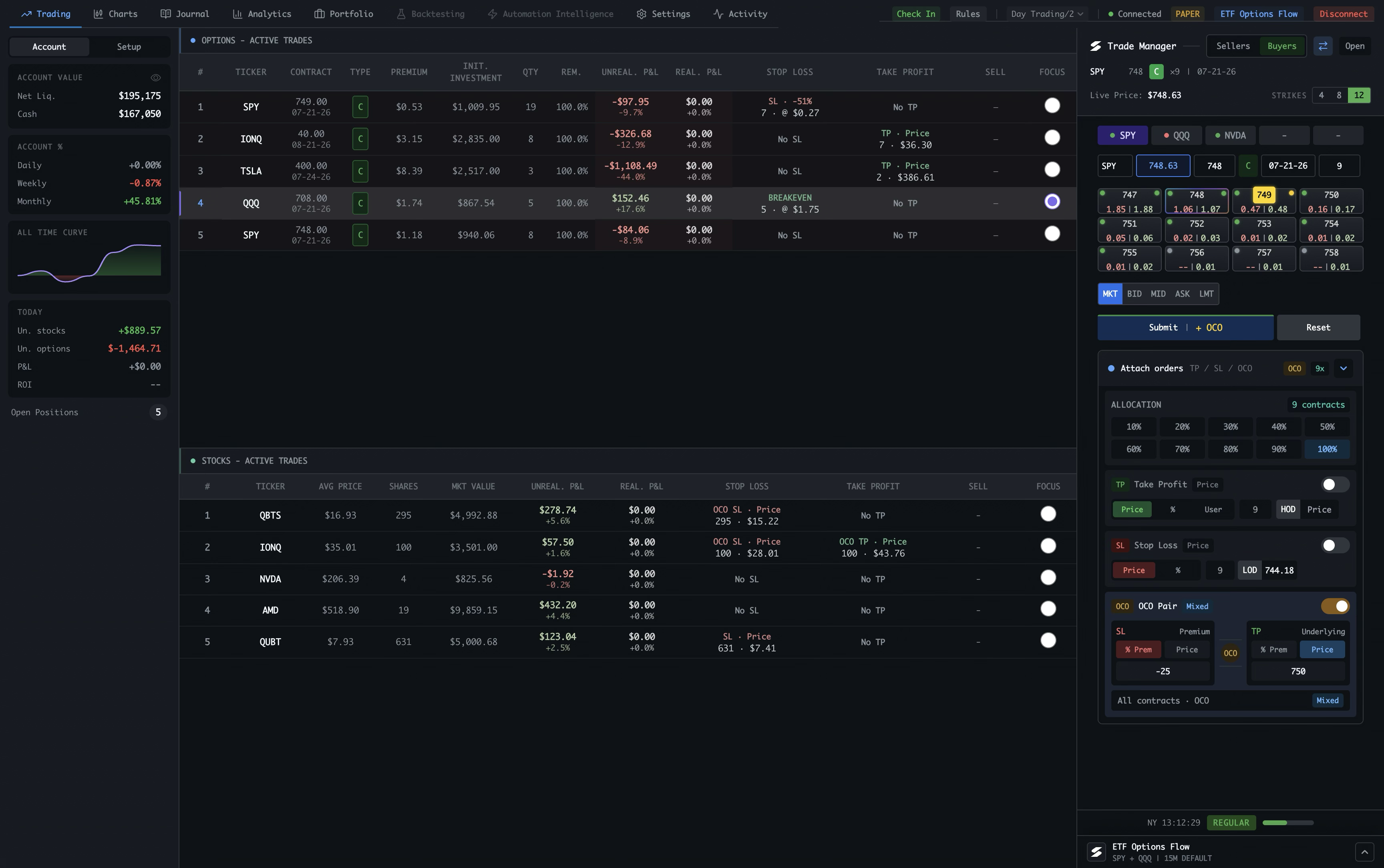
Real-time P&L
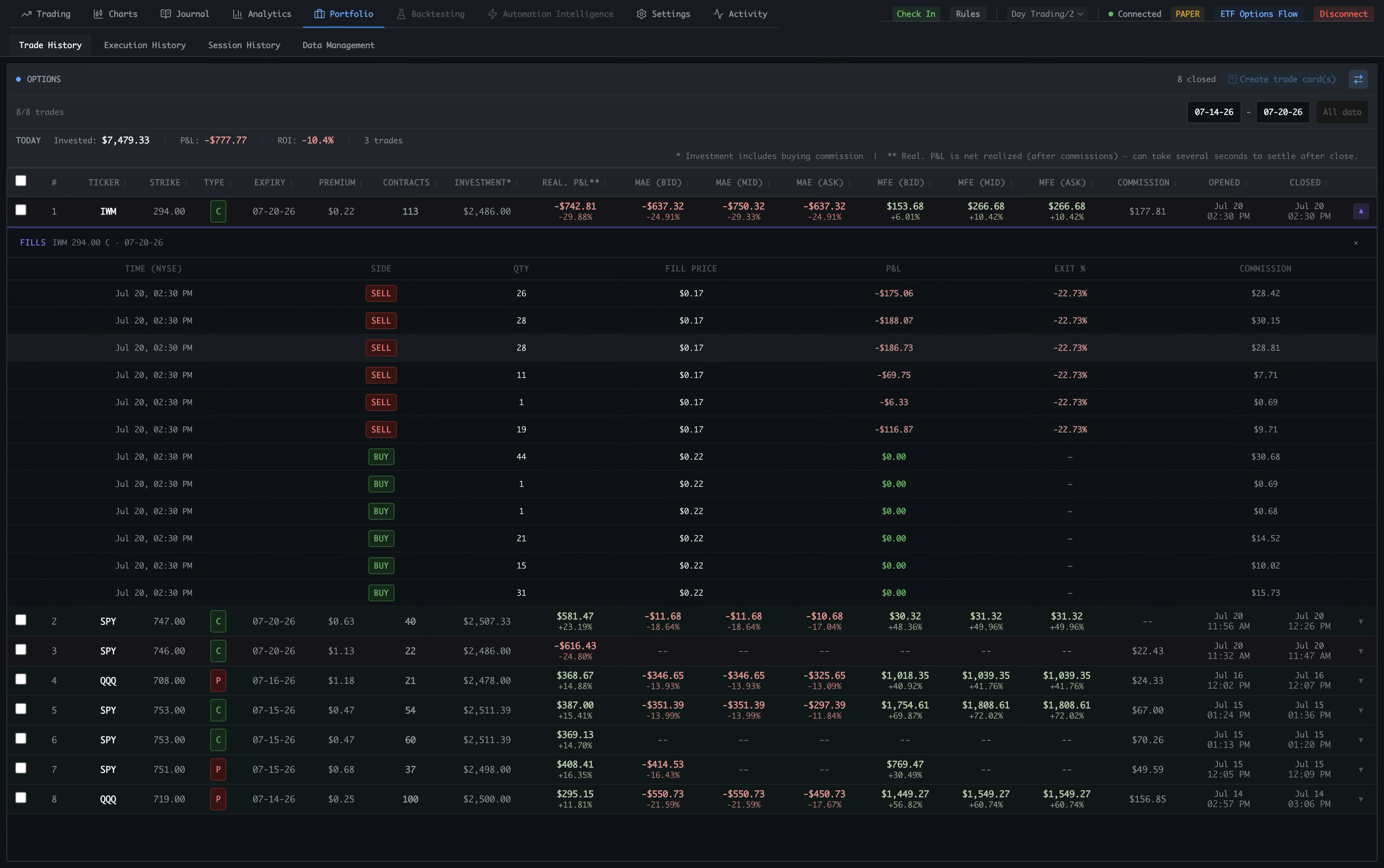
Positions update live as the market moves. Unrealized and realized P&L tracked separately per trade, with color-coded visual indicators.
Spectral takes the complexity out of trading stocks and options on Interactive Brokers — fast execution, one-click brackets, real-time P&L, and native charting in one desktop terminal, so your focus stays on your process and your edge.
Requires Interactive Brokers TWS or IB Gateway
Most traders juggle a broker UI, a charting app, a spreadsheet, and a scattered journal. Spectral replaces the whole stack with one fast desktop terminal — charting, execution, journaling, analytics, backtesting, and automation aren't just bundled side by side, they're wired into one flow.
The usual setup
Four windows. Constant context-switching.
One terminal
One connected flow, not a pile of tools.
Connected, not just bundled.
Chart context, execution, and journal entries share the same trade data end to end — so mistakes surface while they still matter, and reviewing a session takes minutes instead of rebuilding it from memory.
What Spectral is not
Spectral is a terminal for traders who are serious about trading and want to learn, grow, optimize, and automate their own strategy.
Built for IBKR. Designed for speed.
Positions update live as the market moves. Unrealized and realized P&L tracked separately per trade, with color-coded visual indicators.
Enter a fully protected trade in a single click. Stop-loss, take-profit, and OCO logic are pre-wired — no fiddly multi-step broker ticket. One target cancels the other automatically.
Browse strikes and expiries across any underlying. Spectral scores and ranks contracts by your configured strategy and weighting system.
Open a contract premium chart directly from the options workflow, so you can inspect price action for the exact strike and expiry before you trade.
A direct, low-latency connection to TWS and IB Gateway with SMART routing on every order. Live and paper accounts supported. Built to stay responsive during active trading.
Switch between IBKR subaccounts in one click — useful when you separate stocks, options, paper trading, or strategy-specific accounts.
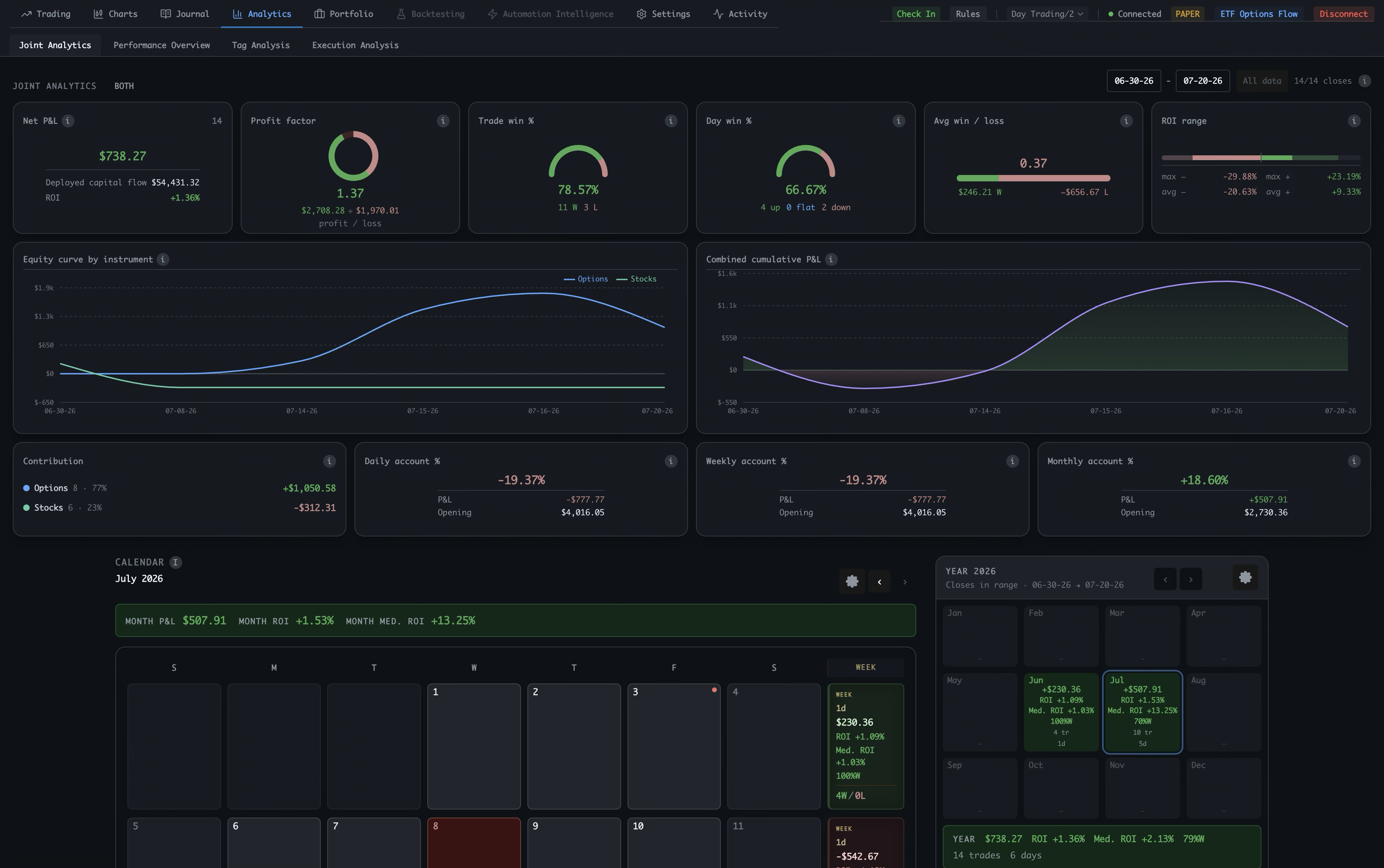
Cumulative P&L area chart, win rate, average hold time. Full trade history with IBKR Flex CSV import for seamless reconciliation.
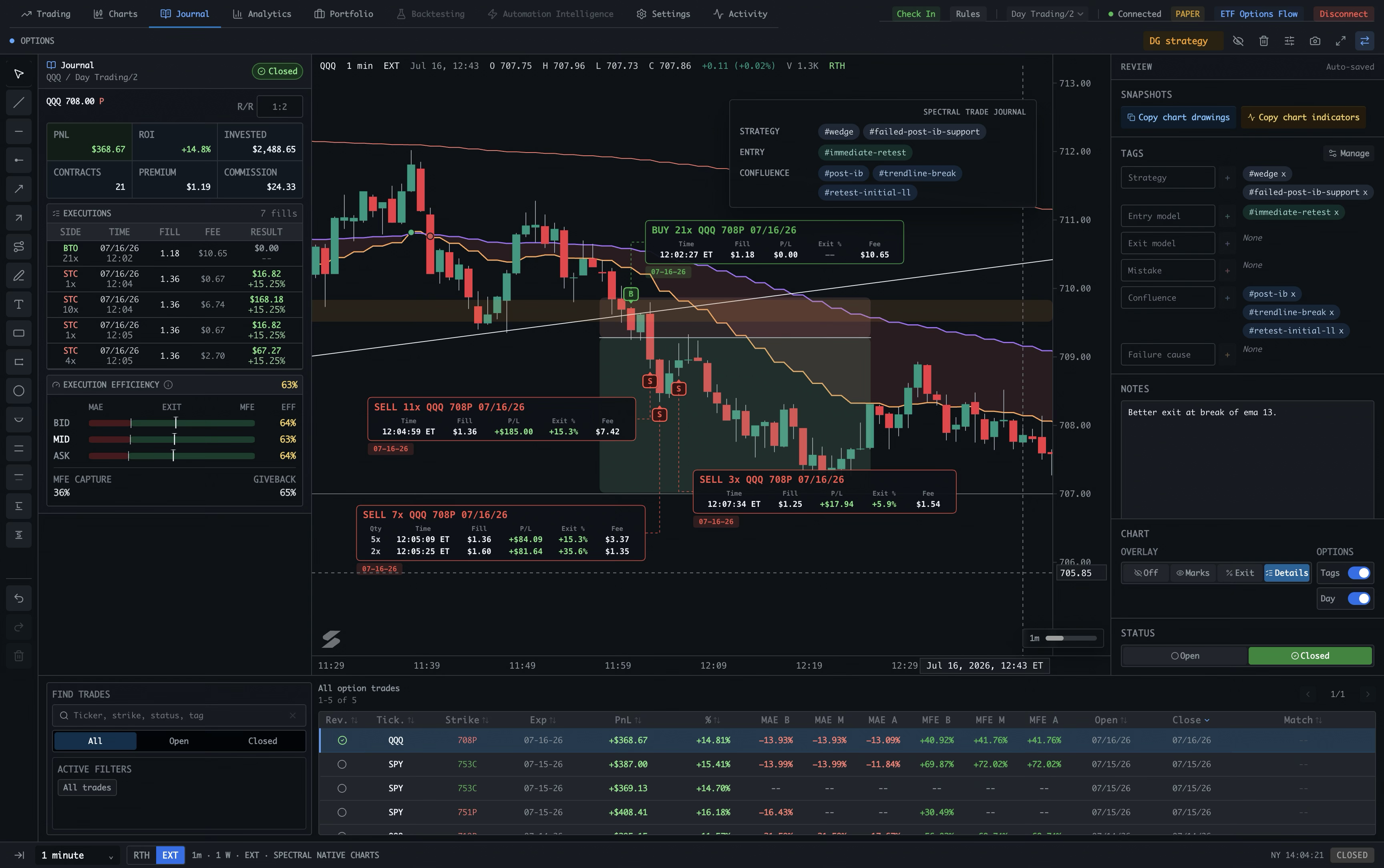
Tag setups, capture your reasoning, and review your own execution — in the same app the trade happened in, not a scattered spreadsheet or separate notebook.
Spectral's own charts, built with modern web technology (TypeScript + Canvas) for execution — order, level, and position context sit right next to price. Custom indicators are coming, written in plain Python or JavaScript — no proprietary scripting language to learn. Included with Plus.
Charting, execution, analytics, and journaling in one workflow — no stitching together a broker UI, a charting app, a spreadsheet, and a journal. One app, one workflow.
Pre-market, regular, post-market, and closed session detection. Always know when you can trade and at what liquidity level.
Select a ticker. Choose a contract. Execute. Exit fast.
Click. Sent. Under 10 ms.
Spectral sends your order to TWS or IB Gateway in milliseconds—not seconds.
Less time than a blink. p95 from Submit click to local TWS/IB Gateway API handoff.
Already watching it? Keep the ticker feed open and go straight to the order.
Simple by design. Fewer steps. Clear actions. Fast entry and exit.
Find it, read it, execute it, manage it, learn from it — one focused view for each step, all sharing one account and one dataset.
Stocks and options tick-by-tick, bracket status at a glance, and partial exits in one click — while the trade is still moving.
Build watchlists by sector, theme, or your own ideas — and see them as a live heatmap. Rotation context before you ever place an order.
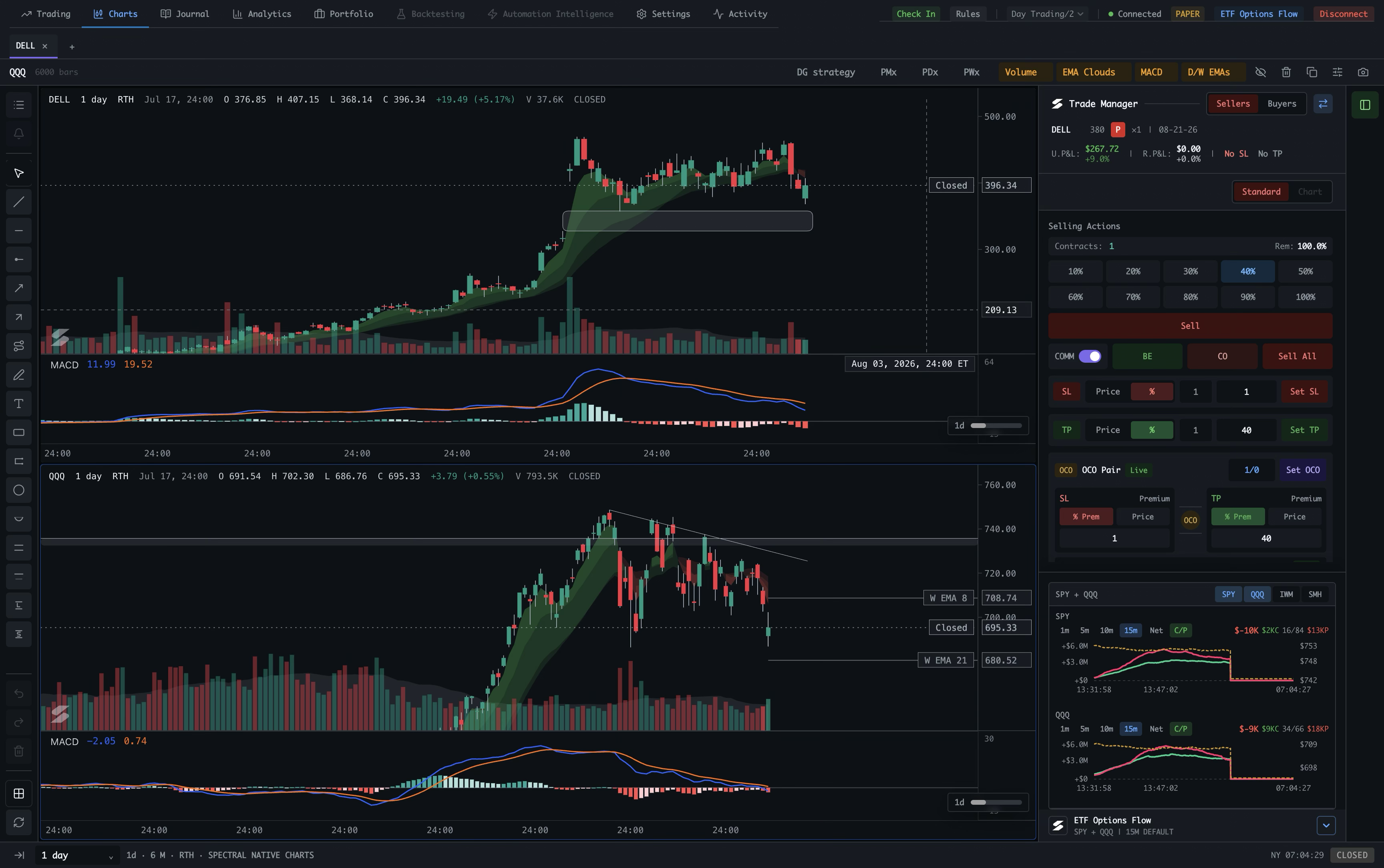
A fast native chart with drawing tools, levels, and zones, designed to keep market context close to execution.
A dedicated view for SPY, QQQ, IWM, and SMH comparing rolling near-ATM call and put premium alongside each underlying price. Net flow is call premium minus put premium — not buyer-vs-seller intent.
The Trade Manager is integrated directly into Spectral Native Charts: place stock and options trades with single-click controls, manage fast entries and exits, and keep the full workflow in one view. Tight on-chart trading integration is coming next, including defining entries and exits directly on the chart.
Pop the Trade Manager into its own window and place it side-by-side with any charting tool you prefer. Keep execution focused while your charting workflow stays exactly the way you like it.
Move from charting and trading into Journal instantly, carry over your drawings and indicators with one click, then tag and analyze each execution in detail.
Turn your trade history into a clear view of P&L, win rate, hold time, and setup performance so you can see what is working. Import your full pre-Spectral history through IBKR Flex to unlock analysis and journaling from day one.
Your trading record, kept together: detailed trade history, exact entry and exit executions, and session history that shows where your time goes. Create shareable trade cards with the detail level you choose.
The whole workspace at a glance — everything above, plus the views around it and what's coming next.
Every open position, live.
Charts built for execution.
Journaling on the chart itself.
Near-ATM call/put premium, alongside price.
Your market map, built from your lists.
Your full, reconciled record.
Understand your edge.
Test before you risk.
Tuned to how you trade.
Coming soon, and honestly labelled — Plus and Pro features land in those tiers; the rest are planned. None of these are implied to ship today.
Write your own indicators in plain Python or JavaScript — no proprietary scripting language. Powered by Spectral’s modern chart engine.
Test setups and playbooks against historical data before you put capital at risk.
Programmatic access to chart and trading data — market data, positions, orders, and events.
Build repeatable trade logic as no-code visual playbooks or in Python — both on one engine.
Place and manage orders directly on the chart — entries, stops, targets, and partial exits right on price action.
Dock directional flow beside the chart so pressure, divergence, and invalidation are visible while managing entries.
Review chart context, marked trades, annotations, and execution quality without leaving the trading workspace.
Track leading sectors and trade themes across short and medium windows so rotation context is visible before entry.
Filter stocks automatically from watchlists and scans using selected indicator conditions so matching setups surface first.
Generate polished, verifiable trade cards from recorded trade data for journaling, coaching, and sharing.
This is just the beginning.
Download. Connect. Execute with precision.
Download and install Spectral on your desktop. You only need an existing IBKR account and TWS or IB Gateway.
Start TWS or IB Gateway and sign in to your paper or live account. Launch Spectral and connect to your ready-to-trade session.
Find your setup, place orders with one click, and manage positions with brackets and real-time P&L—all from one focused workspace.
Clean. Fast. Everything where you expect it.
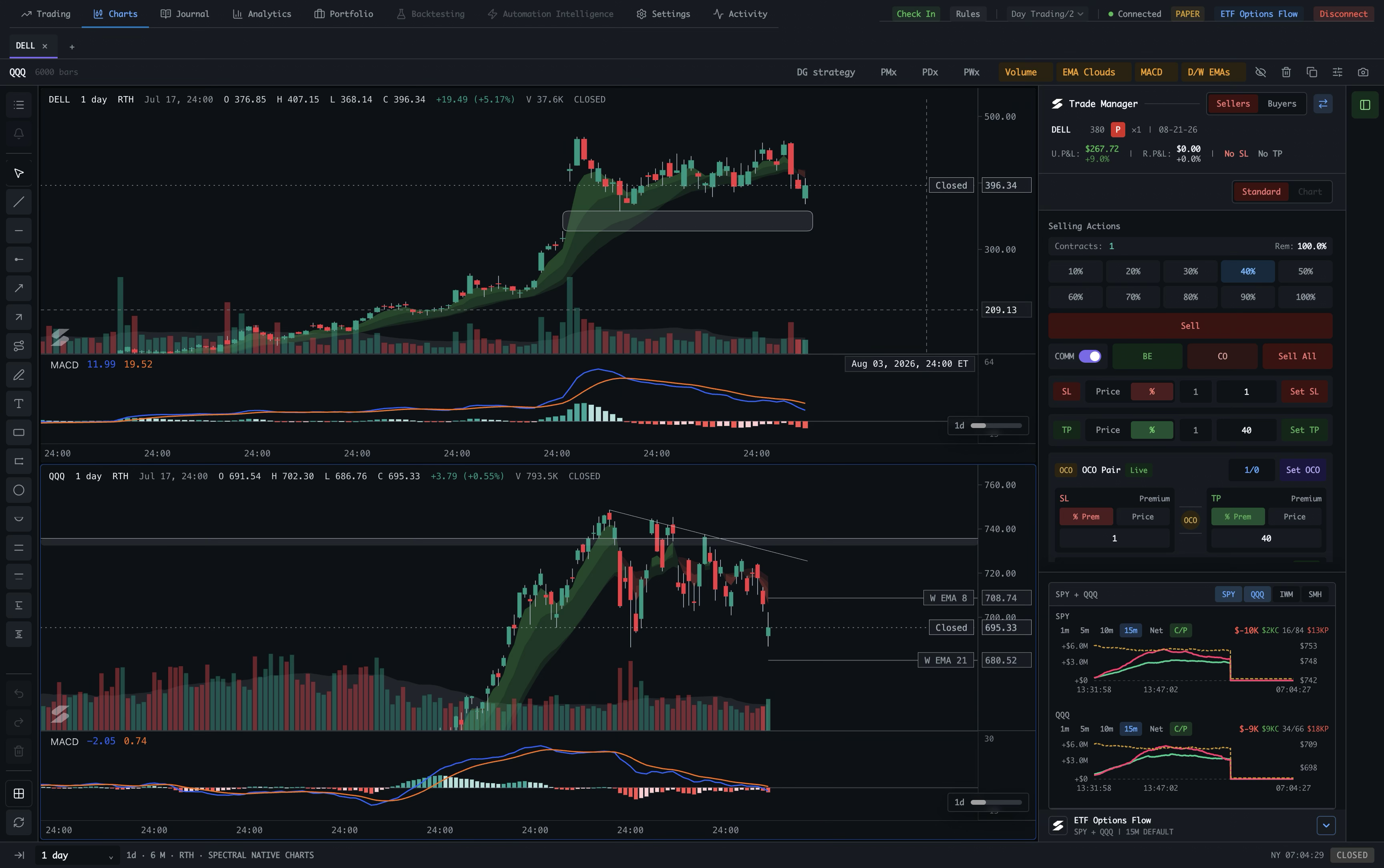
Spectral Native Charts with integrated Trade Manager
A limited number of beta testers get full Plus — free during the beta phase. Enter your email, and we’ll send your license key.
One email, no account. We’ll only use it to send your license and beta updates.
Requires Interactive Brokers TWS or IB Gateway. macOS desktop app.
Start with the core execution app and grow into charting, custom indicators, and full programmatic access — final pricing will be defined after the beta phase.
Fast, professional stock & options execution on Interactive Brokers.
Final pricing will be defined after beta.
Everything in Core, plus native charting.
Final pricing will be defined after beta.
Everything in Plus, plus the programmable platform.
Not yet on sale — join the waitlist.
Spectral, built around how you trade.
Scoped to your needs. Fixed quote.
Beta access is free for selected testers. Final Core, Plus, and Pro pricing will be defined after beta. All licenses require Interactive Brokers TWS or IB Gateway.
Custom functionality is available on request. Selective, professional, fixed-scope work — built directly on the same engine that powers Spectral.
Popular custom builds
Shape the tools around your edge — from how you analyse a setup to how you execute it.
Turn your rules, signals, and market context into indicators that fit the way you read a chart.
Create purpose-built chart tools, annotations, and visual workflows for your analysis process.
Surface the performance, risk, and trade insights that matter most to your decision-making.
Build repeatable order flows and templates around your entries, exits, sizing, and risk rules.
Adapt Spectral to how you actually trade — bespoke order flows, panel layouts, risk rules, and shortcuts tuned to your strategy.
Specific Interactive Brokers changes — new order types, account or execution data handling, reporting, and ib-insync / TWS API integrations.
Entirely new desktop trading or investor tools built on Spectral’s charting, market-data, automation, and broker foundation.
Send a short description of the workflow, IBKR change, or tool you have in mind.
You get a clear, fixed-scope proposal and price — no open-ended retainers.
I build, test against IBKR, and ship it as an update or a standalone build.
Tell me about your trading style or the specific IBKR-related change you want, and I’ll come back with scope and pricing.
Requirements, the beta, tiers, and how your account stays yours.
An Interactive Brokers account with TWS or IB Gateway running, and macOS. Spectral connects to your own local IBKR session — it is a native desktop app, not a web dashboard.
Yes. Beta access includes full Plus — free during the beta phase. Anyone can download the app; you activate it with a license key we email after you register for a seat. Once the enabled beta capacity is full, you can join the waitlist.
Core is fast stock & options execution on IBKR. Plus adds native charting and custom indicators. Pro adds the programmable API and automation (coming soon). Each tier includes everything in the tier before it — for both stocks and options.
Faster than the blink of an eye. From clicking Submit to handing the order off to TWS or IB Gateway takes less than 10 ms, measured empirically.
Interactive Brokers only, by design. The entire workflow — orders, positions, routing, and data — is built around how IBKR traders actually work, rather than being a generic multi-broker layer.
Everything runs through your own Interactive Brokers TWS or IB Gateway connection. Spectral uses the highest-fidelity, broker-sourced data available to your account, with real-time updates when your IBKR market-data subscriptions and connection support them — not delayed third-party snapshots.
Yes. Log into your IBKR paper trading account in TWS or IB Gateway, then start Spectral. Paper trading lets you experience the full Spectral workflow safely before using live capital.
Spectral talks to your own TWS or IB Gateway locally. It never takes custody of your funds, and your broker credentials stay with Interactive Brokers — you log in to IBKR, not to Spectral. Trading always involves risk, regardless of the tool you use. You are solely responsible for your trading decisions and any resulting losses, including when you use automation.
Your Spectral app data is stored locally on your Mac. Spectral runs locally and, for trading workflows, communicates with your own Interactive Brokers session through TWS or IB Gateway. Your account, trade, journal, and strategy data are not uploaded or shared.
Backtesting is coming to Plus, and the local API plus automation are coming to Pro. Join the beta or the waitlist and you will be the first to hear when they ship.
Spectral currently includes a large set of built-in indicators. Plus will soon let you create your own indicators inside Spectral Native Charts using JavaScript or Python — modern, LLM-friendly languages instead of a proprietary scripting language.
Spectral uses Spectral Native Charts — a modern, high-performance chart engine written from scratch with TypeScript and Canvas. The goal is an efficient charting platform where Pro users will soon be able to access chart elements and trading data through the local Spectral API.
Yes. Spectral lets you place the Trade Manager in a side-by-side mode next to any charting app you choose, so you can trade directly where the action is. If that is your workflow, Core is the right license.
Yes. Selective, fixed-scope custom work — bespoke workflows, specific IBKR integration, or an entirely new investor app on Spectral’s foundation — is available on request. See the Custom Work section.