Sellers
Manage an open options position with contract sizing, premium-based protection, and OCO exits.
Manage the contract, not just the position.
The options Sellers view keeps contract details, premium-based exits, fast actions, OCO protection, and the next layer of trailing management in one focused panel.
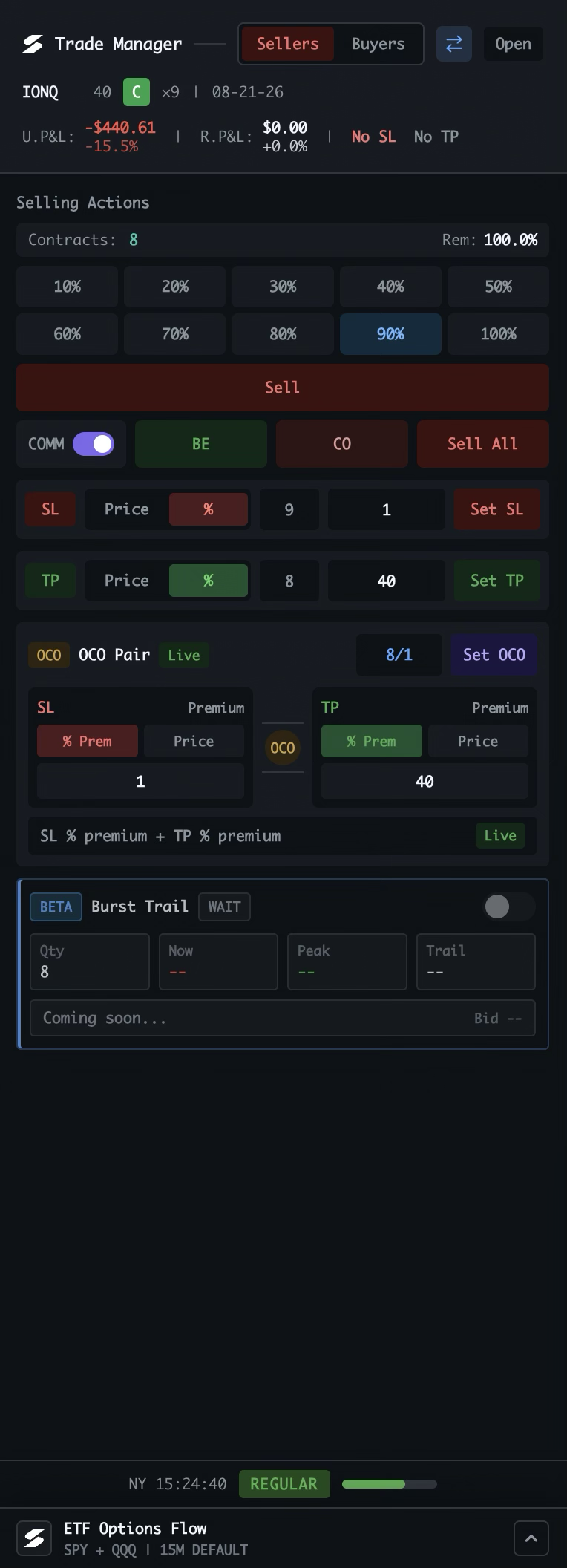
Choose the side and instrument
Sellers is for managing an open options position. The instrument toggle keeps the manager in options mode, and Open moves it into a separate window when needed.
Read the contract at a glance
Ticker, strike, call or put, expiry, contract count, and unrealized and realized P&L stay visible above every action, along with the current SL and TP status.
Choose the exit size
Select 10–100% of the open contracts, check the remaining position, and use Sell to close that portion at market.
Use the fast actions
BE moves protection to breakeven. COMM includes estimated commission, CO cancels open orders, and Sell All exits the full options position.
Choose the protection basis
Choose an underlying-price trigger or a percentage of premium for SL and TP. Adjust the contract quantity, then use Set SL or Set TP to submit the order.
Pair both sides with OCO
Combine a stop loss and take profit for the contracts shown. Each leg can use an underlying price or premium percentage. Set OCO applies the bracket; when one side fills, the other cancels.
See Burst Trail is coming
The beta Burst Trail panel is reserved for trailing management. It shows the quantity and future Now, Peak, and Trail values before activation.
Stay aware of the session
The footer keeps the current time and market session visible, while ETF Options Flow remains available below the manager for broader context.
Same manager, contract-aware controls. Options mode uses the same Buyers / Sellers structure as stocks while adapting sizing, protection, and exit values to contracts and premium.