Buyers
Build a stock order, review the live quote, and attach protection before sending it.
Build the order, then add protection.
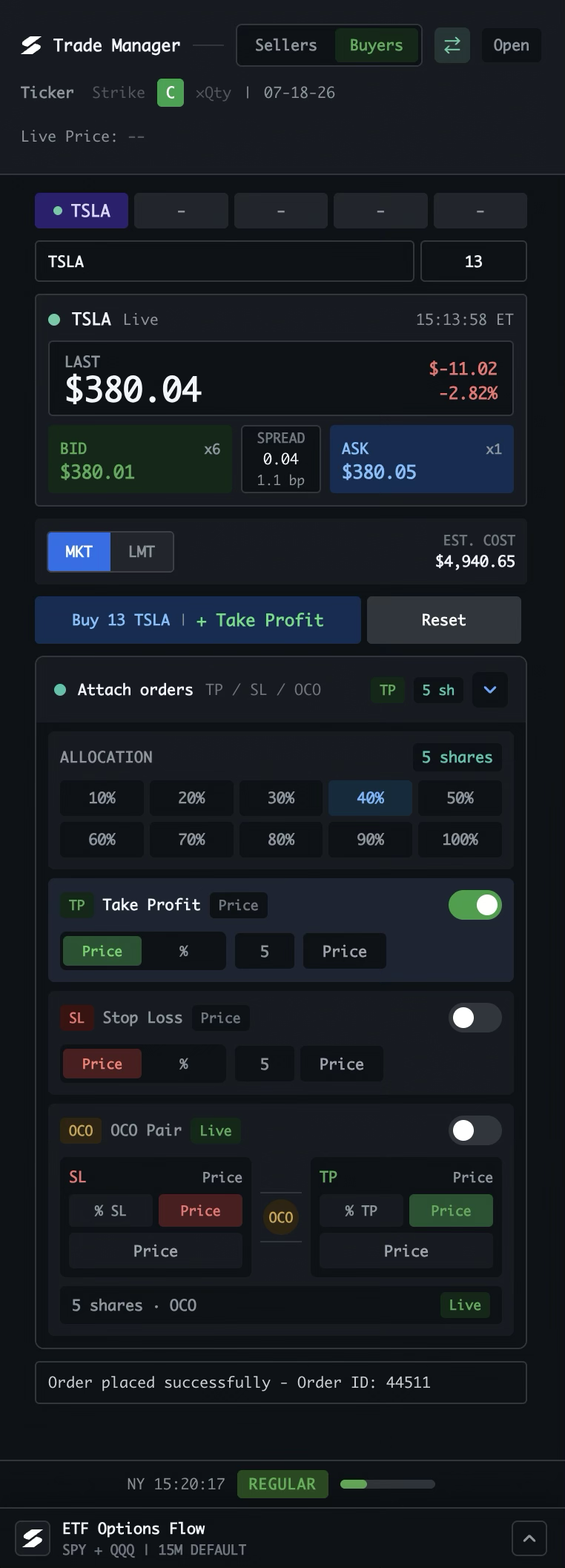
The Buyers view turns a live quote into a defined stock order. Set the size, choose how to execute, and attach take-profit, stop-loss, or OCO protection before submitting.
Start with Buyers
Buyers switches the manager into order-entry mode. The transfer button changes sides, and Open moves the manager into a separate window when you want it beside another tool.
Define the symbol and size
Choose the stock, enter the quantity, and confirm the instrument row. The live quote stays below as soon as the symbol is available.
Use the live quote
Last price, change, bid, ask, size, and spread update together. This is the live reference for your order and any price-based protection.
Choose how to execute
Choose MKT for immediate execution or LMT for a limit order. Estimated cost updates with the order size and current price.
Submit with a clear intent
Buy places the stock order. “+ Take Profit” lets you attach a target as part of the workflow; Reset clears the current order setup.
Allocate protection
Attach orders lets you select how many shares receive protection. Use the percentage buttons or the share count before configuring TP, SL, or OCO.
Configure protection
Enable Take Profit, Stop Loss, or OCO and choose a price or percentage for each leg. When enabled, these orders are prepared with the entry workflow.
Confirm the result
The status line confirms a successful submission and shows the order ID. The footer keeps the session visible, with ETF Options Flow below.
Buyers is for opening a position. Once the order is live, switch to Sellers to manage the open position with the same focused Trade Manager.